
- Summary
- What Is Automated Query Management in EDC?
- Where Can the EDC Query Lifecycle Be Automated?
- Automating Query Detection and Generation
- How EDC Keeps Queries Moving After Generation
- From Site Response to Query Resolution
- How AI Extends Query Management Beyond Predefined Rules
- Why More Automated Queries Are Not Always Better
- Tools That Support Automated Query Management in EDC
- Measuring the Effectiveness of Query Automation
- Human Oversight, Governance, and Exception Handling
- Conclusion
Summary
Automated query management in EDC uses edit checks, workflow rules, alerts, dashboards, and AI-assisted review to identify data issues, generate and route queries, track responses, and support resolution. It reduces repetitive manual work while keeping human oversight for exceptions and judgment-based decisions.
Clinical trial queries help resolve missing, inconsistent, or questionable data before database lock. Traditionally, much of this process requires manual review, follow-up, and tracking across large volumes of study data. EDC automation can reduce this effort by supporting not only query generation but also routing, prioritization, monitoring and review. This helps resolve meaningful data issues with less repetitive work.
What Is Automated Query Management in EDC?
Automated query management is the use of EDC rules, validation logic, workflow tools and AI-assisted capabilities to support different stages of the query lifecycle. At its simplest, an edit check can identify a predefined discrepancy and generate a query automatically. More connected workflows can also help assign the query, notify the appropriate user, track its status, organize it for review, and highlight unresolved or aging items.
This distinction is important: Automated query generation is only one part of automated query management.
There are three broad approaches to query handling:
Approach | How It Works | Best Suited For |
Manual query management | A reviewer identifies an issue and raises the query | Ambiguous or context-dependent discrepancies |
Rule-based automation | Predefined conditions trigger a query or workflow action | Known and deterministic data issues |
AI-assisted query management | AI helps identify, contextualize, or prioritize potential discrepancies | Complex review across larger or interconnected datasets |
In practice, these approaches often work together. Automated checks can handle predictable errors, while more complex issues still require reviewer judgment.
Where Can the EDC Query Lifecycle Be Automated?
Automation can support multiple stages of the EDC query lifecycle, from detecting a potential data issue and generating a query to assigning it to the appropriate user, prioritizing it for review, tracking the site response, evaluating the resolution, and monitoring outstanding queries across the study.
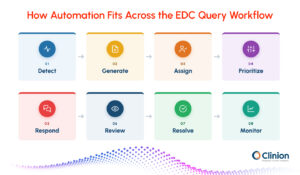
Query Stage | What Happens | Automation Opportunity | Human Role |
Detection | A potential discrepancy is identified | Edit checks, validation rules, AI-assisted detection | Review issues requiring context |
Generation | A query is created | System-generated queries | Raise queries that require judgment |
Assignment | Query reaches the appropriate user or role | Role-based routing | Handle exceptions |
Prioritization | Queries are organized by importance or status | Filters, rules, AI assistance | Assess significance |
Notification | Users are informed that action is required | Alerts and reminders | Follow up when needed |
Response | Site corrects data or provides clarification | Centralized query workflow | Investigate and respond |
Review | Response is evaluated | Review queues and listings | Determine whether the issue is resolved |
Resolution | Query is closed, reopened, or escalated | Workflow-assisted status changes | Make judgment-based decisions |
Monitoring | Query activity is tracked | Dashboards and aging reports | Identify recurring issues |
The most effective workflows use automation for repeatable tasks while keeping human review for exceptions, interpretation and clinically meaningful decisions.
Automating Query Detection and Generation
The first opportunity for automation occurs when clinical data enters the EDC. Instead of relying entirely on manual review to identify every discrepancy, the system can evaluate entered data against predefined study rules and flag conditions that require attention.
When a configured condition is not met, the EDC can identify the discrepancy and, where appropriate, automatically generate a query for the site. This is typically achieved through edit checks and validation rules configured during study build.
Field-Level Checks
Field-level checks evaluate an individual data point against predefined requirements. They are commonly used to identify:
- Missing required values
- Values outside an expected range
- Invalid formats
- Values that do not meet configured conditions
For example, if a required field is left blank or an entered value falls outside the permitted range, the system can flag the field and generate a query for clarification or correction.
Cross-Field Checks
Some discrepancies only become apparent when related fields are evaluated together. Cross-field checks compare two or more data points to identify logical inconsistencies.
For example, the system may flag a record if an end date occurs before the corresponding start date or if related responses within the same form conflict with each other.
Cross-Form and Cross-Visit Checks
Validation logic can also compare information recorded across different forms or study visits. This helps identify inconsistencies that may not be visible when records are reviewed individually.
Examples include:
- Demographic information that differs across forms
- Medication or treatment details recorded inconsistently
- Visit dates that do not align with the expected study schedule
- Related values that conflict across visits
Protocol-Specific Checks
Study-specific rules can be configured around protocol requirements such as eligibility criteria, visit schedules, treatment conditions, and required assessments.
For example, if entered data indicates that a predefined eligibility condition has not been met, the EDC can flag the discrepancy for review.
From Detection to Query Generation
In a rule-based workflow, the EDC evaluates newly entered data against predefined validation logic. If the data does not meet the configured condition, the system identifies the discrepancy and can automatically generate a query for the site to review, clarify, or correct.
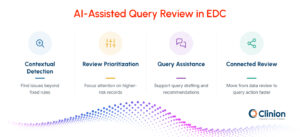
This works particularly well when the expected condition can be clearly defined in advance. It allows predictable data issues to be identified consistently without requiring a reviewer to manually inspect every record.
However, predefined rules can only detect conditions they have been configured to recognize. Unexpected patterns, contextual inconsistencies, or issues requiring interpretation may still need broader data review or human judgment. This is where other forms of review, including AI-assisted approaches, can complement rule-based detection.
How EDC Keeps Queries Moving After Generation
Once a query has been generated, the next challenge is making sure it reaches the right person and is acted on at the right time. Without a structured workflow, queries can remain open simply because they are buried in large volumes of study activity or routed inefficiently. EDC workflow automation can help organize this part of the process by assigning queries, surfacing higher-priority items, and keeping unresolved issues visible until action is taken.
Query Assignment and Routing
Queries can be routed to the appropriate user or study role based on predefined workflow rules and permissions. This helps ensure that the person responsible for reviewing or responding to the issue receives it without additional manual coordination. For example, a query may be directed to a site user for clarification, while other issues may require review by a monitor, data manager, or another authorized study role.
Query Prioritization
Not every open query requires the same level of attention. Queries can be organized using factors such as status, age, site, subject, form, or predefined risk criteria. This helps reviewers focus first on issues that are more urgent, have remained unresolved for longer, or relate to data that are important to study endpoints and data cleaning milestones.
Centralized Query Worklists
A centralized query worklist allows users to review multiple queries from one place instead of navigating through individual subjects and forms to identify outstanding issues. Filters and search options can further narrow the list by site, subject, form, status, or query age, making it easier to focus on the records that require action.
Automated Notifications and Reminders
Automated notifications can alert users when a new query is assigned or when an existing query remains unresolved. Reminder and escalation workflows can also help prevent older queries from being overlooked. These notifications are particularly useful in studies with large numbers of sites or subjects, where manual follow-up can become difficult to manage consistently.
Query Aging and Escalation
Tracking how long a query has remained open helps teams identify potential delays in the review process. Aging thresholds can be used to highlight queries that have not received a response within an expected timeframe. Queries that continue to remain unresolved can then be escalated according to the study's workflow, allowing data teams to focus their follow-up where it is most needed.
By automating assignment, prioritization, and follow-up, the EDC helps move queries efficiently from generation to site action. The next stage is what happens after the site responds: reviewing the response, determining whether the issue has been resolved, and deciding whether the query should be closed or reopened.
From Site Response to Query Resolution
Once a site receives a query, the workflow shifts from identifying the problem to determining whether it has been adequately addressed. The site may correct the underlying data, provide clarification, or explain why the existing entry is accurate.
A connected EDC workflow can make this process easier by keeping the query, response, underlying data, and query history together for review.
Reviewing Query Responses
When a site responds, the reviewer needs to assess both the response and any corresponding data changes. Centralized query views can help reviewers identify answered queries without repeatedly navigating through individual subjects and forms.
The reviewer can then determine whether the response resolves the original discrepancy or whether additional clarification is required.
Reopening Queries When the Issue Remains
A response does not always resolve a query. The explanation may be incomplete, the underlying data may remain inconsistent, or a correction may create another discrepancy.
In these cases, the query can be reopened or followed up according to the configured workflow rather than being treated as resolved simply because a response was received.
Resolving and Closing Queries
When the discrepancy has been adequately addressed, the query can move to resolution. Depending on the EDC and study configuration, certain system-generated queries may respond to changes in the underlying data, while other queries require an authorized reviewer to make the final decision. EDC platforms can distinguish who is allowed to create, answer, view, or close different types of queries, helping keep query actions aligned with study roles and responsibilities.
Maintaining Query History
Each action taken on a query should remain traceable. Query history helps show when the issue was raised, who responded, whether the data changed, and how the query progressed toward resolution. This traceability is particularly important when automation is involved, because teams still need visibility into what action was triggered and how the issue was ultimately handled.
Clinical Data Review and Analysis in Clinical Trials
Learn how clinical data review helps teams identify discrepancies, monitor data quality, prioritize review activities, support query resolution, and prepare cleaner data for analysis.
How AI Extends Query Management Beyond Predefined Rules
Rule-based automation works well when the discrepancy can be anticipated and translated into predefined logic. Clinical data review, however, also involves issues that depend on relationships between multiple data points, study context, or patterns that were not explicitly programmed during study build.
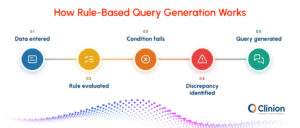
AI-assisted review can complement traditional automation by helping reviewers identify and work with these more contextual issues.
Identifying Contextual Data Issues
Instead of evaluating only whether a single predefined condition has failed, AI can help analyze related data and surface patterns that may warrant further review.
For example, information across adverse events, concomitant medications, laboratory results, visits, or other related records may need to be considered together before a potential inconsistency becomes apparent.
Research on AI/ML applications in clinical trials has described “smart data query” approaches that predict potential discrepancies, explain why they were identified, and generate candidate query text for human validation.
Prioritizing Data for Review
AI can also help reviewers focus on records that are more likely to require attention rather than treating every data point or discrepancy equally.
This is particularly useful as study size and the number of data sources increase, making exhaustive manual review increasingly difficult.
Supporting Query Creation
Once a potential issue has been identified, AI-assisted workflows can help translate that finding into a query or query recommendation. Human review can then determine whether the issue warrants a query and whether the wording and context are appropriate.
Connecting Data Review and Query Actions
Another opportunity is reducing the navigation required between identifying a discrepancy and acting on it. Instead of moving between separate listings, reports, subjects, and forms, connected review workflows can bring the relevant data and available query actions closer together.
The distinction between the two approaches is therefore important: rule-based automation executes logic that has already been defined, while AI-assisted review can help surface issues that require broader context and interpretation.
AI does not remove the need for reviewer oversight. It adds another layer of assistance to the existing query-management workflow.
Key Challenges in Clinical Data Management
Explore common clinical data management challenges, including data quality, query handling, system integration, compliance, reconciliation, and preparing reliable data for analysis.
Why More Automated Queries Are Not Always Better
The effectiveness of query automation should not be measured by how many queries a system can generate. Poorly designed rules can create large numbers of low-value queries, increasing site burden and giving data managers more issues to review without necessarily improving the data that matter most.
A large retrospective analysis of more than 49 million clinical data points found that fewer than half of the queries analyzed resulted in a direct or indirect data change. The authors recommended a more targeted approach, particularly around critical data.
Effective automation therefore needs to consider query value, not only query volume.
Focus on Critical Data
Checks and review strategies should give appropriate attention to data that are important to participant safety, study endpoints, and the reliability of trial results.
Avoid Overlapping Checks
Different rules should not repeatedly query the same underlying issue. Overlapping logic can create duplicate or closely related queries that increase work for both sites and reviewers.
Review High-Volume Query Sources
If one form, field, site, or edit check consistently generates a disproportionate number of queries, teams should investigate why.
The issue may relate to unclear CRF design, site training, data-entry instructions, or an edit check that is too sensitive.
Evaluate Whether Queries Add Value
Teams can look beyond query counts and assess whether queries lead to meaningful corrections, clarifications, or improvements in critical data.
Apply a Risk-Based Approach
ICH E6(R3) emphasizes identifying factors critical to trial quality and applying proportionate, risk-based approaches. The same principle is relevant when designing data-review and query strategies: effort should be concentrated where it contributes meaningfully to participant protection and reliable trial results.
The goal of automation should therefore be fewer unnecessary interactions and faster attention to meaningful discrepancies, rather than simply producing more system-generated queries.
Tools That Support Automated Query Management in EDC
Automated query management is usually supported by several capabilities working together rather than one standalone tool.
Tool or Capability | Role in the Query Workflow |
Edit Check Engine | Evaluates data against predefined conditions and identifies discrepancies |
Rules Engine | Triggers queries or other configured actions when defined conditions are met |
Data Review Listings | Brings related data together for review across subjects, forms, or visits |
Query Worklist | Centralizes open, answered, aging, or resolved queries |
Role-Based Workflow | Routes query actions according to user responsibilities and permissions |
Filters and Prioritization | Helps reviewers focus on relevant queries by site, subject, status, age, or risk |
Notifications and Reminders | Alerts users when action is required or a query remains unresolved |
Query Dashboards | Shows volumes, status, aging, and other query trends |
Bulk Actions | Reduces repetitive handling when multiple records require similar query actions |
APIs and Integrations | Supports query or discrepancy workflows involving data outside the EDC |
AI-Assisted Review | Helps identify contextual issues and support prioritization or query creation |
The important consideration is how these capabilities work together. A strong edit-check engine may automate discrepancy detection, but teams can still face substantial manual work if assignment, review, follow-up, and monitoring remain disconnected.
Measuring the Effectiveness of Query Automation
Query automation should be evaluated by how effectively it improves data-review workflows, not simply by the percentage of queries generated automatically.
Useful measures include:
Query Volume
Total query volume provides a basic view of workload, but should be interpreted alongside other measures. A decline in queries can be positive if unnecessary checks have been removed, while an increase may indicate either improved detection or excessive querying.
Query Rate by Site, Subject, or Form
Breaking query volume down by site, subject, form, or field can reveal where discrepancies are concentrated.
Repeated patterns may indicate the need for site training, clearer data-entry instructions, CRF changes, or refinement of edit checks.
Query Aging
Query aging shows how long issues remain unresolved and helps identify items that require follow-up or escalation.
Average Resolution Time
Measuring the time between query creation and resolution can indicate how efficiently queries are moving through the workflow.
Reopened Query Rate
Queries that are repeatedly reopened may indicate unclear query wording, incomplete responses, or issues that require more context than the existing workflow provides.
Manual vs. System-Generated Queries
Understanding where queries originate can show how much discrepancy-detection work is handled through configured rules and where manual review still contributes.
Query Efficacy
Teams can also examine whether queries result in a meaningful correction or clarification. This can be particularly useful when evaluating high-volume edit checks.
Query Backlog
Tracking open and aging queries becomes especially important as the study approaches data-cleaning milestones and database lock.
No single metric determines whether query automation is successful. The more useful question is whether the workflow is reducing repetitive effort while resolving important data issues efficiently and consistently.
Human Oversight, Governance, and Exception Handling
Automation can make query management more efficient, but clinical data workflows still need clearly defined controls around who can take action, how exceptions are handled, and when human judgment is required.
Define Roles and Permissions
Study teams should establish who can create, answer, review, reopen, and close queries. Role-based permissions help ensure that automation does not bypass established responsibilities.
Keep Judgment-Based Decisions With Appropriate Reviewers
Not every discrepancy has a deterministic answer. Clinical context, protocol interpretation, safety considerations, or information from multiple sources may be required before deciding whether a query is appropriate or adequately resolved.
Plan for Exceptions
Automated workflows should account for cases where the standard path does not apply. This may include corrected data, conflicting responses, duplicate queries, late-arriving data, or changes that trigger additional checks.
Maintain Traceability
Automated and manual actions should remain visible through appropriate audit trails and query histories. Reviewers should be able to understand what happened, when it happened, and who or what initiated the action.
Control Changes to Query Logic
Edit checks and workflow rules may need refinement during a study, but changes should be reviewed, tested, approved, and deployed through controlled processes.
Keep AI Within the Review Workflow
Where AI is used to identify discrepancies, prioritize records, or assist with query creation, its output should remain subject to appropriate permissions and human review.
Automation works best when governance is designed into the workflow rather than added after the technology has been implemented.
Switching to a New EDC System
Learn how clinical teams can plan an EDC transition, manage data migration, maintain validation, reduce disruption, and protect study continuity.
Conclusion
Automating query management is not simply about raising discrepancies faster. The greater opportunity is to reduce the manual work surrounding detection, routing, follow-up, review, and monitoring while ensuring that meaningful data issues receive the right level of attention.
Rule-based checks remain valuable for predictable discrepancies. Workflow automation helps those queries move efficiently through the study, while AI-assisted review can add context and help reviewers focus on issues that predefined logic may not capture easily.
The result should not be more queries. It should be a more focused, traceable, and efficient data-review process in which automation handles repeatable work and experienced reviewers concentrate on the decisions that require judgment.
How Clinion Supports a Connected Query Management Workflow
Clinion EDC supports configurable edit checks, query management, and integrated data review within one workflow. Its Agentic Assistant extends this with AI-assisted review, helping users investigate data, view existing queries, and issue queries with less navigation.
This connects validation, data review and query action while keeping query resolution and judgment-based decisions under human oversight.